Playing the pads
The keyboard
On a melodic track the 32 pads are a keyboard. The pads show the key you chose on the Set page:
- the root note lights in the track colour,
- the other notes in the key light grey,
- notes outside the key stay dark (they still play in Chromatic mode).
+ and − move the keyboard an octave up or down. Each track remembers its own octave, so a bass stays low when you come back to it.
Pad layouts
Two knobs on the Set page (Shift + Step 5) shape the grid:
- MODE: Chromatic puts every semitone on the grid and the key only colours the pads. In Key folds the grid to the scale, so every pad is in key.
- LAYOUT: the geometry, below.
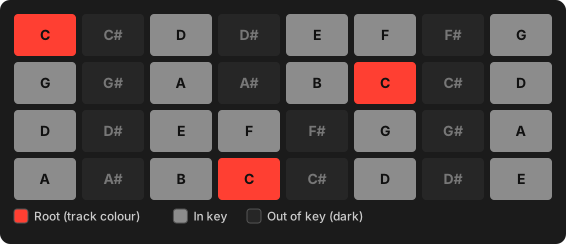
One semitone per pad to the right, a fourth per row up, like a guitar or bass fretboard. Any chord or scale shape works the same in every key and on every row. The root sits on the 4th pad of the bottom row.
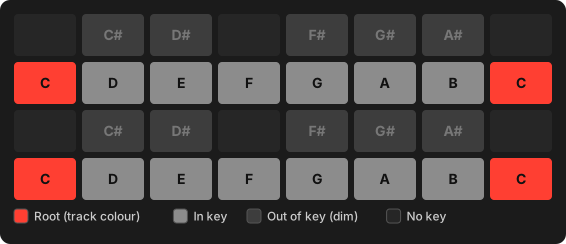
Two octaves of piano keyboard: white keys on rows 1 and 3, black keys above them. Pads with no key stay dark. Keys outside the scale light dimly, so you can still see the key.
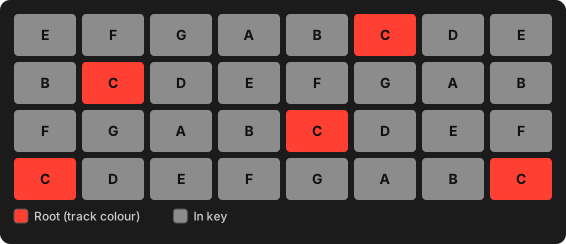
Only the scale's notes, three scale steps per row up. The same finger pattern is the same chord in any key, and you can't play a wrong note.
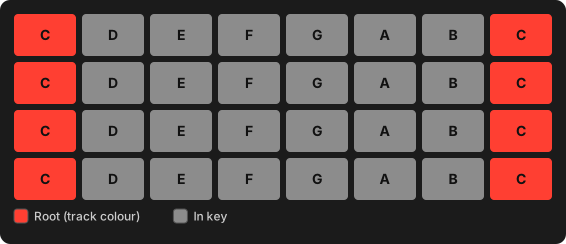
One octave of the scale per row, root at the left: 1 2 3 4 5 6 7 1.
Easy for melodies. With a five-note scale the rows overlap slightly.
MODE, LAYOUT, ROOT and KEY belong to the Set and apply to every track.
Full velocity
Shift + Step 10 toggles full velocity: every pad plays at maximum velocity however hard you hit it. Handy for programming drums at an even level. The setting stays on across Sets until you turn it off.
Drums
On a drum track the pads are a drum rack (see Tracks & sounds → Drum modules). Press a pad to play it and select it for editing and step entry.
Muting one drum voice
Works like Move: Mute + pad, Shift + Mute + pad
Hold Mute and press a pad to mute that voice in the sequencer. Shift + Mute + pad solos it. Press again to undo either.
- A muted voice rests grey on the pads; it still plays when you hit it by hand.
- Solo is exclusive: soloing another voice moves the solo. When the solo ends, your earlier mutes come back.
- Voice mutes apply to every clip on the track, are saved with the Set and can be undone.
Use it to drop the kick out for a breakdown or to solo the hats while you edit them, without touching the pattern.
External MIDI keyboard
Plug a class-compliant USB MIDI keyboard or groovebox into the Move's USB-A port. It plays the selected track, just like the pads.
- Any MIDI channel plays the selected track. Choose the destination on the Move.
- Velocity comes from the keyboard. Full velocity only affects the pads.
- Recording works as with the pads: live, step recording, and hold-step + key.
- On a drum track, C1 (MIDI note 36) plays pad 1, C#1 pad 2, and so on.
- Mod wheel and pitch bend reach the synth live but are not recorded.
- Other CCs, aftertouch and MIDI clock are ignored.