Controls
Every control in one place. Chapters in the manual explain each in context.
Shift + Step shortcuts
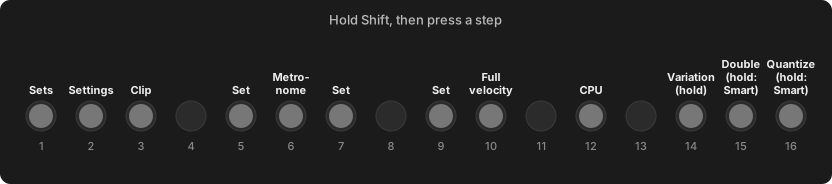
| Combo |
Action |
| Shift + Step 1 |
Sets |
| Shift + Step 2 |
Settings |
| Shift + Step 3 |
Clip page: speed, length, transpose, quantize (Track view) |
| Shift + Step 5 / 7 / 9 |
Set page: tempo, swing, quantize, root, key, mode, layout |
| Shift + Step 6 |
Metronome on / off |
| Shift + Step 10 |
Full velocity on / off |
| Shift + Step 12 |
CPU meter (again: reset peaks) |
| Shift + hold Step 14 |
Variation, or New Clip on an empty track |
| Shift + Step 15 |
Double the loop. Hold: Smart Double |
| Shift + Step 16 |
Cycle the clip's quantize (0 / default / 100 %). Hold: Smart Quantize |
The shortcuts also work in Session view, except the Clip page and the generators, which need a single clip.
Shortcuts that differ from Move
| Combo |
On Move |
In Movy |
| Shift + Step 3 |
Workflow settings (count-in, quantize…) |
The Clip page. Count-in is always one bar; the quantize default is on the Set page. |
| Shift + Step 16 |
Quantizes the clip (again on each press) |
Moves the clip to the next quantize setting (0 / default / 100 %), never destructive. Hold for Smart Quantize. |
| Shift + Capture |
Clears the capture buffer |
Schwung's audio recorder. Clear Capture with hold Delete + Capture. |
| Hold step + jog |
Note length |
Turns pages, to lock any knob. Length: LEN on the Step page, or step A + step B. |
| Hold Mute |
Shows and toggles automation |
The 16-track mute map. |
Navigation and pages
| Control |
Action |
| Jog |
Scroll slots (Chain view), pages (parameter pages) or list rows. |
| Jog click |
Open the slot / load the selection / open a list knob's menu. |
| Shift + jog click |
Chain view: replace the slot's module. Parameter pages: jump to a section. |
| Touch the jog |
Show what a click does here. |
| Back |
One level out; cancel; at the top: Leave Movy? |
| Knobs 1–8 |
Edit the parameters on screen. Touch: show name and value. |
| Knob 1 on a preset page |
Browse presets. Shift + knob 1: next bank. |
| Hold a file knob + jog click |
Open the file browser (sample, wavetable…). |
| Hold a module-screen knob + jog click |
Open the module's own screen. |
| Hold a knob ~1 s |
Assign it to LFO 1 or 2 (jog picks, click assigns). |
| Volume knob |
Master volume. |
| Hold track button + volume knob |
That track's volume. |
| Shift + touch volume + jog click |
Close Movy from anywhere. |
| Power button |
Power off (asks first). |
Playing
| Control |
Action |
| Pads |
Play notes / drum voices. |
| + / − |
Octave up / down (per track). In Session view: move the focused group. |
| Shift + pad (drums) |
Select a voice without playing it. |
| Mute + pad (drums) |
Mute that voice. Shift + Mute + pad: solo it. |
| Track buttons |
Select a track in the focused group. Hold: look and come back. |
Sequencer
| Control |
Action |
| Step |
Add / remove a note. |
| Hold step + pads |
Set the step's notes. |
| Hold step A + press step B |
Note length from A to B. |
| Hold step + knob |
Lock a value on that step (Step page on page 0). |
| Hold step + volume knob |
Step velocity. |
| Play |
Start / stop. |
| Rec |
Record live (count-in from a stop; punch-in while playing). |
| Hold Rec (stopped) |
Step recording: pads enter, ▶ rest/tie, ◀ back/untie, step jumps. |
| Capture |
Keep what you just played. |
| Hold Delete + Capture |
Clear the Capture buffer. |
| Hold Copy, press source, then destination(s) |
Copy a step, a bar (Loop view) or a clip (Session view). |
| Delete alone |
Delete the current clip. |
| Delete + step / bar / clip |
Clear it. |
| Hold step + Delete |
Clear that step's locks, keep its notes. |
| Hold step + + / − |
Transpose the held step. |
| Hold step + ◀ / ▶ |
Nudge the held step. |
| Hold Delete + pad |
Remove that note or voice from the clip. |
| Hold Delete + touch knob |
Clear that parameter's automation on the clip. |
| Undo / Shift + Undo |
Undo / redo. |
| ◀ / ▶ |
Previous / next bar. |
Loop view
| Control |
Action |
| Loop |
Open the Loop view (tap) or peek (hold). |
| Press a bar |
Select it. |
| Double-tap a bar |
Loop that bar. |
| Press two bars |
Loop the range. |
| Hold Loop + jog |
Grow / shrink the loop by a bar. |
Session view
| Control |
Action |
| Note/Session |
Session view (tap = stay, hold = peek). |
| Pads |
Launch clips. |
| Steps |
Open a track (tap = stay, hold = peek). |
| Hold Note/Session + step |
Jump to a track and keep the selector up (any view). |
| Hold Note/Session (Session tapped on) |
Session mixer: knobs = tracks 1–8, jog = 9–16. |
| Hold Loop + Step 1, 3 … 15 |
Launch scenes 1–8. Keep holding and press more to build a song. |
Mute and solo
| Control |
Action |
| Mute |
Mute the current track. |
| Mute + track button |
Mute that track. |
| Hold Mute + step |
Mute any of the 16 tracks (mute map). |
| Shift + any of the above |
Solo instead. |
Generator preview
| Control |
Action |
| Jog |
Hear ORIG and each option; past the last, every other generator that suits the clip. |
| Touch the jog |
Show the generator's name. |
| Knobs |
Reshape the option. Touch: name and value. |
| Jog click / Back |
Keep the option shown. |
| Undo / Shift + Undo |
Step back / forward through the preview: knob turns, edits, option changes; past the first, ORIG, then the preview closes. Undo right after keeping reopens it. |
| Hold a track button |
Show the track's pages while held. |