Settings & system
Opening and leaving Movy
Open Movy from Schwung's Tools menu (hold Shift, touch the volume knob, click the jog), or set the Move to start in Movy at power-on (see Install → Open Movy).
While Movy starts or a Set loads, the screen shows loading messages and the pads and knobs stay off until the instruments are ready. Back always works.
To leave, press Back at the top level (the Chain view). Leave Movy? offers Close Movy: turn the jog to it and click. Movy saves first, then the Move returns to its own software with Schwung.
If Movy stops responding: hold Shift, touch the volume knob and click the jog. Movy closes (saving if it can) and gives the device back within two seconds, whatever state it is in.
Powering off
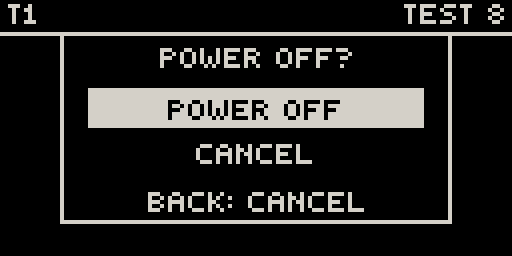
Tap the power button and Movy asks Power off?. Click the jog to confirm, or Back to carry on. Movy saves the Set, then the Move shuts down.
Settings
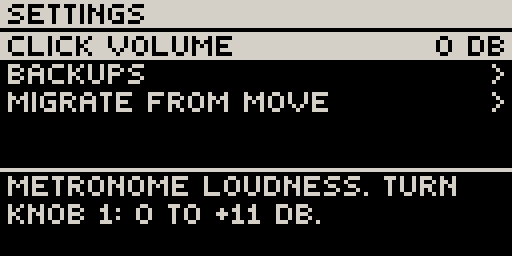
Shift + Step 2 opens Settings, a list: jog to move, jog click to open a row, Back to close. The line at the bottom explains the selected row.
| Row | What it does |
|---|---|
| CLICK VOLUME | How loud the metronome and count-in are. Turn knob 1: 0 dB to +11 dB. Kept for this Move, not per Set. |
| BACKUPS | Older versions of the open Set (see Backups). |
| MIGRATE FROM MOVE | Copy work from Movy 0.35 and earlier, and Schwung, out of your Move Sets again (see Work from older Movy versions). Click once to arm (CONFIRM?), again to run. |
The CPU meter
Shift + Step 12 shows how much processing your Set uses. Back closes it; pressing Shift + Step 12 again resets the peak marks.
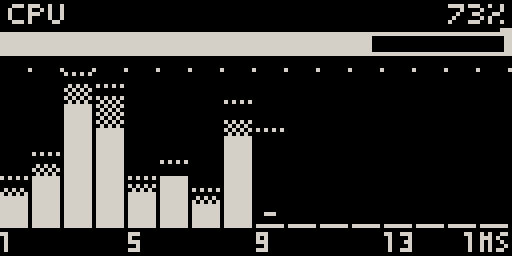
- The bar under the header is the whole Set. Under 80 % is comfortable; near 100 % you are at the edge; over 100 % you will hear dropouts. The notch above the bar is the worst moment since you opened the page.
- Each column is one track: solid for the instrument, checkered for its effects, a dotted line for its peak. A short dash means the track is loaded but silent, and costs nothing right now.
- When send effects are loaded, three more columns appear on the right under
SND.
Six or seven tracks of ordinary synths is typical; light modules go much further. A silent track costs nothing.
The built-in speaker
Movy applies the same speaker EQ as Move, so the built-in speaker sounds the same as under Move. It follows Schwung's Global Settings → Audio → Spkr EQ (Auto / Off / On). If you opened Movy from the Tools menu and the speaker sounds thin, set it to On. Headphones and line out are never affected.
Recording a video of your screen
Schwung's web mirror works with Movy. On a computer, open http://move.local:7700/mirror. It shows the screen and every pad and button light, with your hands' presses. Record saves a video, Save PNG a still. Sound is included while Schwung's Mirror Display setting is on (Schwung Manager → Settings). Good for sharing a jam, or for showing a bug.